
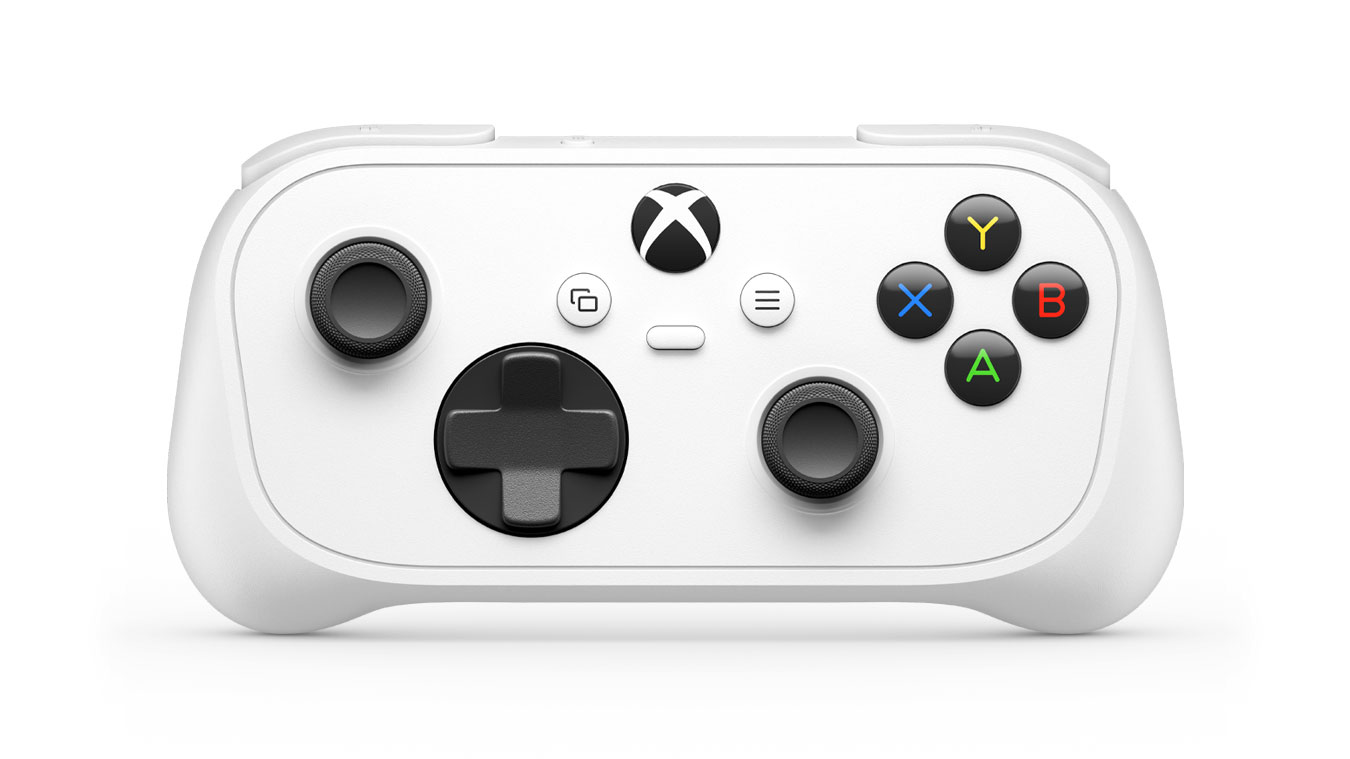
The Microsoft Xbox Nano Controller, a pocket-sized gamepad priced at $49.99, is the smallest controller Microsoft has ever made, and it is set to launch on November 4, 2026. Announced in mid-October through Xbox Wire, it shrinks the familiar Xbox layout into a rechargeable, portable design aimed at younger players, people with smaller hands, and anyone who wants a controller they can slip into a jacket pocket. This guide pulls together everything reported so far: the price, the specs, compatibility, the holiday bundles, how it stacks up against compact rivals, and the questions Microsoft has not yet answered. It is based on announcements and early coverage, not hands-on testing, so treat it as a pre-launch briefing rather than a review. For more plain-English gadget and tech explainers, AI Power Digest keeps following the story as new details arrive.
What Is the Microsoft Xbox Nano Controller?
The Microsoft Xbox Nano Controller is a compact wireless gamepad built for Xbox consoles, Windows PCs, mobile devices, and select smart TVs. Engadget’s report describes it as offering the standard Xbox controller layout in a more compact format, with a rechargeable battery and a design Xbox says could suit younger players and others with smaller hands. Microsoft itself says the controller is designed to fit nearly every pocket and budget, and calls it lighter and shorter than most modern smartphones.
It is not meant to replace the standard Xbox Wireless Controller for everyone. Instead, it fills a different role: a portable, lower-priced option for travel, cloud gaming, couch-side backup, or a child’s first controller. That positioning matters when you decide whether the Microsoft Xbox Nano Controller makes sense for you.
Microsoft Xbox Nano Controller Price and Release Date
According to Windows Central, pre-orders for the Microsoft Xbox Nano Controller opened on the Xbox website at $49.99. Pure Xbox lists the UK price at £44.99 and says the controller is available to pre-order through the Microsoft Store, with a scheduled release of November 4, 2026.
Reported launch details include:
- Price: $49.99 in the US and £44.99 in the UK, about $20 less than the typical $69.99 price of a standard Xbox Wireless Controller, according to IGN’s figures as relayed by Yahoo Tech.
- US release date: November 4, 2026.
- Markets: TechPowerUp reports a November 4 launch across 36 markets, including the US, UK, Japan, and much of Europe, while Engadget says it ships in the US on November 4 and reaches 35 other countries next month, with other markets later.
- Pre-orders: Open now through Xbox and the Microsoft Store.
Regional pricing and availability can vary, so check the official Xbox store for your country before ordering.
Microsoft Xbox Nano Controller Specs at a Glance
Here are the confirmed specifications reported by multiple outlets:
| Feature | Details |
|---|---|
| Length | A little over 5 inches |
| Weight | 3.5 ounces |
| Inputs | Full standard Xbox layout, 18 gameplay inputs reported |
| Extra button | One programmable Action Button |
| Connectivity | Xbox Wireless and Bluetooth |
| Power | Built-in rechargeable battery, USB-C charging reported |
| Compatibility | Xbox consoles, Windows PC, iOS, Android, select smart TVs |
| Cloud gaming | Supported (Xbox Cloud Gaming) |
| Launch price | $49.99 / £44.99 |
Size and Weight
The headline feature is the size. GameSpot reports the controller is a bit over five inches long and weighs 3.5 ounces, making the Microsoft Xbox Nano Controller the smallest controller Microsoft has produced. TechPowerUp adds that despite the small body, it keeps all 18 standard gameplay inputs, so the button count is not reduced.
Connectivity
The controller connects over Xbox Wireless and Bluetooth, according to TechPowerUp. That combination is what lets the Microsoft Xbox Nano Controller work with consoles, PCs, phones, tablets, and certain smart TVs without a dongle in most cases, though pairing steps differ by device.
Battery and Charging
A built-in rechargeable battery replaces the AA batteries used in many standard controllers. One outlet reports USB-C charging. Microsoft has not shared battery life figures, which is one of the biggest open questions heading into launch.
The Programmable Action Button
Engadget notes that the extra Action Button can be programmed through the Xbox Accessories app to do things like take a screenshot or record gameplay. GameSpot similarly describes it as a quick-access key for captures. For a controller this small, a shortcut button is a smart addition.
Compatibility: Where the Microsoft Xbox Nano Controller Works
Reports consistently list broad compatibility. Windows Central says the controller is built for Xbox, Windows PC, and Xbox Cloud Gaming, with release for Xbox consoles, PC, iOS and Android mobile devices, and select smart TVs. That breadth is central to the pitch, because the Microsoft Xbox Nano Controller is designed to be used wherever you play, not just in front of a console.
If you plan to use it with a specific TV, phone, or tablet, confirm support on Microsoft’s compatibility pages, since “select smart TVs” means not every model will qualify. Cloud gaming users should also check their subscription and region, because cloud gaming rules and limits can change.
Holiday Bundles: Samsung, Meta, and Game Pass
Microsoft is pairing the controller with partners for the holiday season. GameSpot reports a US bundle that includes the controller and two months of Game Pass Ultimate for new subscribers when you buy a new Samsung TV, and says Microsoft and Meta are working on a bundle with a Meta Quest headset. Windows Central and TechPowerUp confirm the Meta Quest offer in the US.
Key points about the bundles:
- They are described as US holiday offers.
- The Game Pass Ultimate portion is for new members.
- Qualifying Samsung TVs and Meta Quest headsets are included.
- Specific models, dates, and terms should be verified with the retailer.
How the Microsoft Xbox Nano Controller Compares to Rivals
At $49.99, the price invites comparison with both Microsoft’s own standard controller and other compact gamepads.
Versus the standard Xbox Wireless Controller. The standard controller typically costs $69.99, according to IGN’s figures. The Nano is $20 cheaper and smaller, but a full-size controller usually offers a larger grip and, in many cases, more comfortable long sessions. Which is better depends on whether portability or ergonomics matters more to you.
Versus other compact controllers. TechPowerUp points out that $49.99 is noticeably more than some small controllers on the market, such as the CRKD Atom+ at $29.99 and the 8BitDo Lite 2 at $34.99, and suggests native Xbox Wireless support might justify some of the premium, with battery life likely deciding whether it is worth it. Engadget compares it to 8BitDo’s portable gamepads, noting it is not quite as tiny as the brand’s Micro controller.
The honest takeaway is that the Microsoft Xbox Nano Controller competes on integration rather than price. If you want first-party Xbox Wireless support and Microsoft’s accessory ecosystem, it makes sense. If you only want the cheapest small controller, third-party options may be more tempting.
What We Still Don’t Know About the Microsoft Xbox Nano Controller
Early coverage highlights several gaps, and it is worth knowing them before you pre-order:
- Battery life. TechPowerUp says Microsoft has not shared a figure.
- Rumble and impulse triggers. The same report says there is no word on whether the controller includes haptic features such as rumble or impulse triggers, and Windows Central suggests it does not include the more advanced tech found on some premium controllers.
- Color options. One report says the announced colorway is white with colorful face buttons, while another says color options have not been shared. Check the store page for current details.
- Comfort and build quality. No one outside Microsoft has published full hands-on impressions yet, and a smaller body can be a comfort trade-off for adult players.
- Trigger and stick feel. Engadget says the reviewer is interested in trying it to see how the triggers feel, a good reminder that key details are still untested.
Until reviews arrive, treat any strong claim about how the controller feels or lasts as speculation.
Who Should Consider the Microsoft Xbox Nano Controller?
Based on Microsoft’s own framing and early coverage, the likely audiences are:
- Younger players and anyone with smaller hands, who may find a full-size controller bulky.
- Travelers and mobile gamers, who want something pocketable for phones, tablets, or laptops.
- Cloud gaming fans, since the Nano is built to work with Xbox Cloud Gaming on TVs, phones, and PCs.
- Households that want a backup controller without paying full price.
- Meta Quest or Samsung TV buyers who may get the controller in a bundle.
If you play long sessions on a console and prefer a full grip, the standard controller may remain the better choice.
A Quick History: How Xbox Controllers Have Changed
To see why a compact model is notable, it helps to look back. The first Xbox controller, nicknamed “the Duke,” was introduced at the Game Developers Conference in 2000 and shipped with the original console in most territories, according to the Xbox controller entry on Wikipedia. It was famously large, and Microsoft later released the smaller “Controller S” as a response to feedback about size.
Over the following console generations, Microsoft refined the design, and the modern Xbox Wireless Controller became one of the most widely used gamepads on consoles and PC. Against that backdrop, a controller that is only a little over five inches long represents the opposite end of the spectrum from the original, and the Microsoft Xbox Nano Controller shows how far the lineup has moved from “bigger is better” toward options for different hands, budgets, and places to play.
Why Compact Controllers Became a Category
Small gamepads are no longer a novelty. Third-party makers such as 8BitDo and CRKD already sell pocket-sized controllers aimed at mobile gaming, retro play, and travel, and the Engadget and TechPowerUp reports both compare the Nano with those products. The appeal is straightforward: phones, tablets, handheld PCs, and cloud gaming services have turned many screens into places to play, and a small controller is easier to carry than a full-size one.
What first-party controllers add is certainty. A controller made by the platform holder generally promises tighter integration with system features, settings apps, and updates. That is the core argument for the Microsoft Xbox Nano Controller over cheaper alternatives, and it is also why independent reviews will matter: integration only helps if the hardware feels good to use.
Using the Nano for Cloud Gaming: Practical Tips
Because cloud gaming is one of the stated use cases, here are a few general tips for anyone who plans to pair a controller with a phone, tablet, or TV. These are common-sense steps, not official instructions, so follow Microsoft’s setup guide when it is available.
- Start with a strong connection. Cloud gaming depends on a stable network, so use a reliable Wi-Fi connection or wired internet where possible.
- Pair over the right protocol. The Nano supports both Xbox Wireless and Bluetooth, and the correct choice may depend on the device you are connecting to.
- Keep accessory software current. Engadget notes the Action Button is programmed through the Xbox Accessories app, which is also where accessory settings are typically managed.
- Charge before you travel. With a built-in battery and no confirmed battery life figure, topping up before a trip is a sensible habit.
- Check service terms. As GameSpot noted, cloud gaming limits may change, so read the current rules for your subscription.
Smaller Hands, Younger Players, and Comfort
Microsoft has pitched the controller to younger players and people with smaller hands, and that framing deserves a measured look. A shorter, lighter body can make a controller easier for children and some adults to hold. At the same time, a smaller shell can mean less room for fingers, and some players find that compact controllers become tiring during long sessions.
It is also worth noting what the product is not. The Microsoft Xbox Nano Controller is a general-purpose compact gamepad, not an accessibility device. Players who need adaptive hardware have separate options in the Xbox ecosystem, and should look at those rather than assuming a smaller controller will solve every comfort need. As always, trying a controller in person, when possible, is the best way to know how it fits your hands.
What to Look for When Reviews Arrive
Independent reviews should start appearing around launch. When they do, these are the questions worth checking, since early coverage left them open:
- Battery life. How many hours does a full charge last, and how long does charging take?
- Grip comfort. Is the Microsoft Xbox Nano Controller comfortable for adult hands over a one-hour session?
- Trigger and stick feel. Do the triggers have enough travel, and do the sticks feel precise?
- D-pad quality. Is the directional pad suitable for platformers and fighting games?
- Connection reliability. How does Xbox Wireless compare with Bluetooth in real use, including on phones and TVs?
- Latency in cloud gaming. Does the controller feel responsive during streamed play?
- Build quality. Does the shell feel sturdy enough to survive being tossed in a bag?
- Value. Does the reviewer think the premium over cheaper compact controllers is justified?
Concerns and Caveats
No product launch is perfect, and early coverage raised a few questions about the Microsoft Xbox Nano Controller:
Price versus competitors. As noted, some compact rivals cost less. Whether the premium is worth it depends on how much you value first-party support.
Cloud gaming limits. GameSpot notes that for people planning to use the controller for cloud streaming, Microsoft will soon put caps on how much you can play before you must pay more. If cloud gaming is your main use case, read the current terms before buying, because they can change.
A busy launch window. TechPowerUp notes that the timing is not ideal, given competing launches and holiday spending. Waiting for reviews is a reasonable approach.
Don’t Confuse It With the PowerA Nano
Shoppers searching for a small Xbox controller may come across the PowerA Nano Enhanced Wired Controller, a licensed third-party accessory for Xbox Series X|S that has been sold through retailers and marketplaces. That is a different product from the Microsoft Xbox Nano Controller: it is wired, made by a different company, and unrelated to Microsoft’s new announcement. If you want the new first-party model, make sure the listing says “Xbox Nano Controller” from Microsoft and shows the November 2026 release.
Where the Nano Fits in Microsoft’s Wider Strategy
The launch makes more sense when you look at the partnerships around it. Microsoft is pairing the controller with Samsung TVs and Meta Quest headsets, two very different screens, and bundling Game Pass Ultimate for new members. Taken together, those deals suggest an emphasis on playing Xbox games on devices that are not traditional consoles, with cloud gaming as the connective tissue.
That reading is an interpretation, not an official statement, so treat it with care. What the sources do confirm is the combination of broad device support, bundle offers tied to TVs and headsets, and a price positioned below the standard controller. Whether those pieces add up to a long-term strategy is something only Microsoft can say, and it is the kind of question reviewers and analysts will likely revisit after launch.
Price Math: What the Numbers Say
Putting the reported prices side by side makes the trade-offs easier to see:
- Standard Xbox Wireless Controller: about $69.99 (typical price, per IGN’s figures relayed by Yahoo Tech).
- Microsoft Xbox Nano Controller: $49.99, which is $20 less than the standard model.
- 8BitDo Lite 2: $34.99, which is $15 less than the Nano.
- CRKD Atom+: $29.99, which is $20 less than the Nano.
In other words, the Nano sits in the middle: cheaper than a full-size first-party controller, but pricier than the two third-party compact options named by TechPowerUp. If you value first-party Xbox Wireless support and Microsoft’s accessory app, the premium over those rivals may be acceptable. If you only need a basic travel controller, the cheaper picks deserve a look. Either way, a clear sense of your own priorities will help you decide whether the Microsoft Xbox Nano Controller is worth it.
Common Misunderstandings
A few points tend to get muddled in early coverage of a new gadget, so here is a quick clarification list:
“It replaces the standard controller.” Microsoft positions it as a portable, lower-priced option, not a replacement.
“It only works with Xbox consoles.” Reports list Windows PC, iOS, Android, and select smart TVs as well.
“Every bundle includes it for free.” The offers are limited US holiday promotions with specific retailers, and the Game Pass portion is for new members only.
“All the specs are final.” Details such as battery life and haptic features had not been announced in the reports reviewed here, so assume some details may still be filled in.
“It is the same as any small Xbox controller you can already buy.” Third-party products with similar names exist, so confirm you are buying Microsoft’s model.
Key Dates to Remember
- Now: Pre-orders are open through the Xbox website and Microsoft Store.
- November 4, 2026: Scheduled launch date in the US and other initial markets.
- Holiday season 2026: US bundle offers with qualifying Samsung TVs and Meta Quest headsets, each with two months of Game Pass Ultimate for new members.
- After launch: Independent reviews and additional market rollouts.
Reading Launch Coverage Critically
Pre-launch articles, including this one, rely on company announcements and early press impressions, which tend to emphasize strengths. A healthy approach is to separate three kinds of statements: confirmed facts, such as the price, weight, and release date; reasonable expectations, such as broad compatibility; and open questions, such as battery life and comfort. When the first hands-on reviews land, compare them with the announcement and note where reality differs. That habit protects you from impulse buys and helps you judge whether the Microsoft Xbox Nano Controller lives up to its pitch.
A Buyer’s Checklist Before You Pre-Order
If you are thinking about ordering the Microsoft Xbox Nano Controller, use this quick checklist:
- Decide your main use. Travel and cloud gaming favor the Nano; long console sessions may favor a full-size controller.
- Check compatibility. Confirm your TV, phone, or tablet is supported.
- Compare total cost. Look at bundles and cheaper compact alternatives before paying full price.
- Read the return policy. Because the controller is untested by independent reviewers, a flexible return window is valuable.
- Wait for reviews if unsure. Battery life and comfort are the biggest unknowns.
- Buy from official sources. Use the Xbox website, Microsoft Store, or authorized retailers to avoid counterfeit or mislabeled listings.
Timeline: From Announcement to Launch
- Mid-October 2026: Microsoft announces the controller on Xbox Wire and opens pre-orders at $49.99.
- Same period: The announcement lands alongside Sony’s limited-edition DualSense controller reveal, according to GameSpot.
- November 4, 2026: Scheduled launch date in the US and other launch markets.
- Holiday 2026: US bundles with qualifying Samsung TVs and Meta Quest headsets, each with two months of Game Pass Ultimate for new members.
- Later: Additional markets are expected beyond the initial launch countries, according to Engadget.
Frequently Asked Questions About the Microsoft Xbox Nano Controller
What is the Microsoft Xbox Nano Controller? It is Microsoft’s smallest Xbox controller, a pocket-sized wireless gamepad with a rechargeable battery and the standard Xbox layout.
How much does the Microsoft Xbox Nano Controller cost? It is priced at $49.99 in the US and £44.99 in the UK, according to reports.
When is the Microsoft Xbox Nano Controller release date? It is scheduled to launch on November 4, 2026, with pre-orders already open.
What devices work with the Microsoft Xbox Nano Controller? Reports list Xbox consoles, Windows PCs, iOS and Android devices, and select smart TVs, plus Xbox Cloud Gaming.
Does the Microsoft Xbox Nano Controller have a rechargeable battery? Yes. It has a built-in rechargeable battery, and one outlet reports USB-C charging. Battery life has not been announced.
How big is the Microsoft Xbox Nano Controller? It is a little over 5 inches long and weighs 3.5 ounces, according to Microsoft’s description.
Does the Microsoft Xbox Nano Controller have rumble or impulse triggers? Microsoft has not said. Early reports note there is no word on those features, so check final specs before buying.
Is the Microsoft Xbox Nano Controller better than the standard Xbox controller? It depends. The Nano is smaller and $20 cheaper, but a full-size controller may be more comfortable for long sessions.
Is the Microsoft Xbox Nano Controller good for kids? Microsoft has described it as suited to younger players and smaller hands. Comfort varies by child, so check return policies and consider trying one in a store.
Is the Microsoft Xbox Nano Controller the same as the PowerA Nano? No. The PowerA Nano Enhanced Wired Controller is a separate, wired, third-party accessory, while the Microsoft Xbox Nano Controller is Microsoft’s own new wireless model.
Does the Microsoft Xbox Nano Controller come with Game Pass? Only in certain US bundles. Samsung TV and Meta Quest bundles include two months of Game Pass Ultimate for new members, according to reports.
The Bottom Line
The Microsoft Xbox Nano Controller is an interesting new entry in the Xbox accessory lineup: small, rechargeable, broadly compatible, and priced $20 below Microsoft’s standard controller, though still higher than some third-party compact options. Its biggest strengths are portability and first-party integration, while its biggest unknowns are battery life, haptic features, and everyday comfort. Until independent reviews arrive, a measured approach is to compare it with your actual needs, check bundles and return policies, and wait for hands-on impressions if you are unsure. For continued coverage as launch day approaches, keep following AI Power Digest.
This article is for general informational purposes only and is based on Microsoft’s announcement and early press coverage as of mid-October 2026. Specifications, prices, bundles, and availability may change, and no hands-on testing was performed. Verify details with Microsoft or an authorized retailer before purchasing. This is not a product endorsement or financial advice.